Create Vehicles
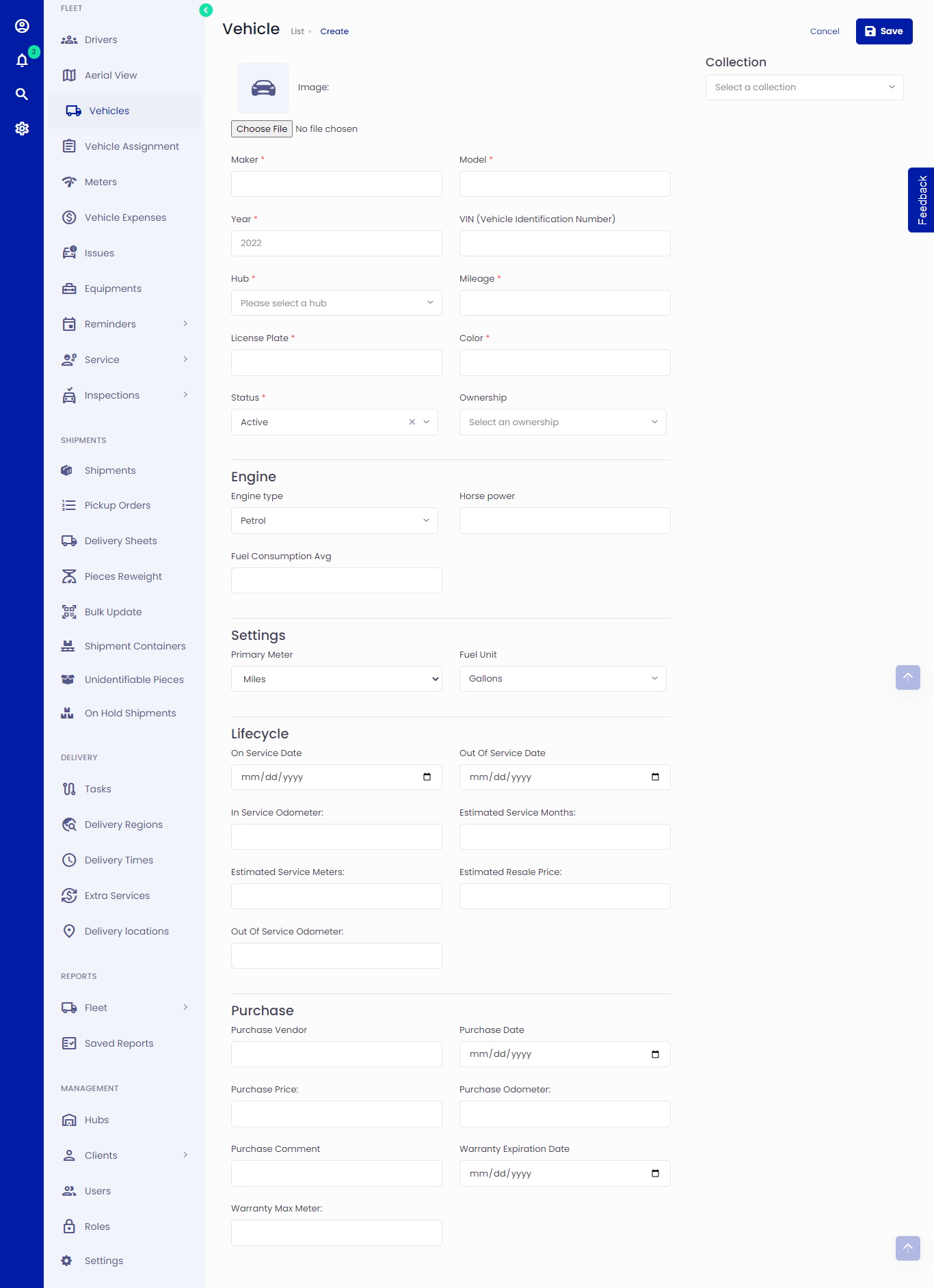 Figure.01 Adding Vehicles
Vehicles are the heart of the Fleet management system. To create Vehicles, follow the below instructions.
Creating Vehicles
Click on Vehicles -> Create
Fill in the vehicle details. You can record various data about each asset, including:
Basic details (year, make and model, VIN - Vehicle Identification Number, license plate, colour, etc.)
Ownership status (owned, leased, rented, and customer)
Vehicle status (active, inactive, in shop, out of service, and sold)
Engine and Lifecycle details (engine type, horsepower, service date, estimated service months etc.)
Settings (primary meter, fuel unit, measurements)
Purchase information (purchase vendor, purchase price, purchase date, purchase odometer etc.)
Assign a hub to the vehicle. Find out more about the Hub and how to set one up here.
Select a collection. Read more about collections below.
Click save when you are done adding the necessary vehicle details.
You can edit/delete the vehicle.
Collections
A collection is a type of vehicle. There are five collections by default; however, you can create more from the management section by clicking on Settings -> Vehicle Collection -> Add New.
- Motorcycles
- Cars
- Vans
- Trucks
- Buses