Add or Update Meter Entry
Keeping the meter readings for your Vehicles current and up-to-date with actual meter values is a crucial component of effective fleet management. Many Preventative Maintenance services are scheduled by meter interval, and current information is necessary for timely "Due Soon" and "Due" reminders, whether via an on-screen alert or email notification.
To provide an easy way to track and update these current meter values, the Fleet management system offers many ways to add and edit Meter Readings.
Meter Entry Methods
Meters can be updated as follows, with each method explained in detail below the summary:
- Main Menu
- Vehicle Overview
- Linked Records
- Inspections
- Issues
- Service Reminders
- Service Task
Main Menu
Create a Meter Record
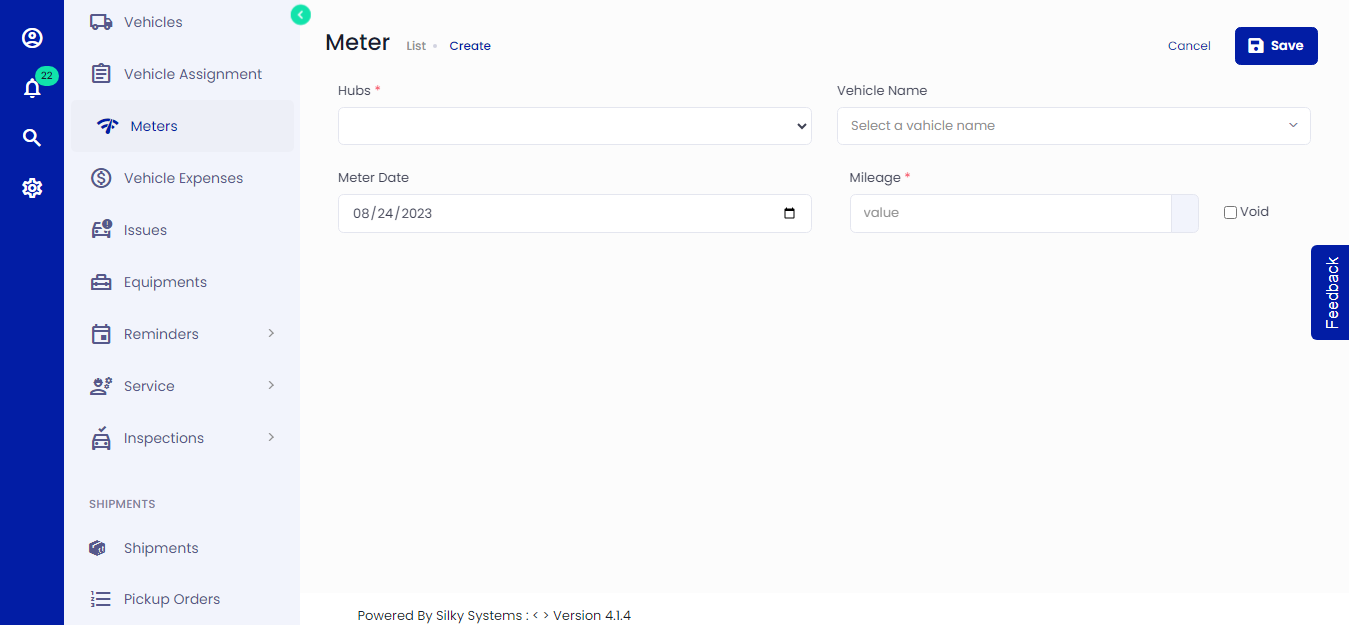 Figure.01 Add Meter Value
Click on Meters -> Create
Select a Hub and Vehicle
Enter the date for which you want to record the meter
Enter the Meter value. Mark the meter value as void if you don't want to include it in meter calculations.
Click save when you are done.
You can edit/delete the meter values from Meter -> List.
Vehicle
You can add a meter record in mileage while creating a vehicle. Similarly, you can edit the record by editing the vehicle. Learn more about creating and updating the vehicle here.
Linked Records
When you record an Inspection, Issue, Service Reminder, or Service Task, a new Meter Reading is automatically generated with the associated meter value and date.