Meter Overview
What is Meter?
A Meter in a Fleet management system is a catchall term that describes an odometer. Up-to-date meter data in the Fleet management system is used to track vehicle usage, provide metrics that help monitor your costs, and trigger Service Reminders configured with meter interval tracking.
Vehicles in the Fleet management system have a Primary Meter.
When a meter value, or Meter Reading, is entered into the Fleet management system, it's referred to as a Meter Entry.
This article covers setting your preferred meter measurements, how the Fleet management system validates Meter Entries and more.
Configure Meter Measurement Units
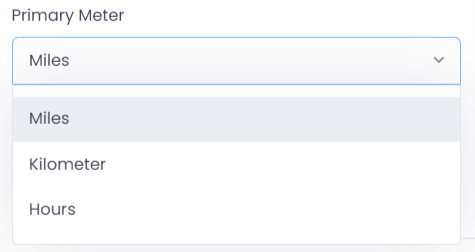
Figure.01 Meter Measurement Units
In the Fleet management system, you can configure vehicle-specific meters. The Fleet management system allows for measurement units of Miles, Kilometers or Hours. You can configure the meter management unit by creating or editing the vehicle.
If you want to change your measurement unit settings at any time, it's important to note that any existing meter readings will stay the same value, but the unit name will change. For example, if you have recorded a meter entry of 91,000 miles and changed the meter units to kilometers, the entry will now display as 91,000 kilometers.
Manage Meter Entries
The Fleet management system offers ways to add and manage Meter Entries. You can read more about adding a single Meter Entry for a vehicle here.
Mark as Void
The fleet management system keeps a log of all Meter Entries created throughout the system. This includes meter readings manually inputted by creating meter records and editing vehicle details and readings from linked records, such as Inspections, Issues, Service Reminder, or Service Task.
Meter Entries must follow the correct sequence, incrementing in value by date. If the meter reading was miss entered by mistake, edit the Meter Entry to correct the error, or select/deselect the void checkbox. A void meter value does not affect the vehicle's Current Reading and won't be used in any reporting or usage calculations.
View Meter History
Each Meter Entry is saved and logged in Meter -> List. You can view the meter history for an individual vehicle or all vehicles by clicking Meter on the meter record.